软件说明About this release
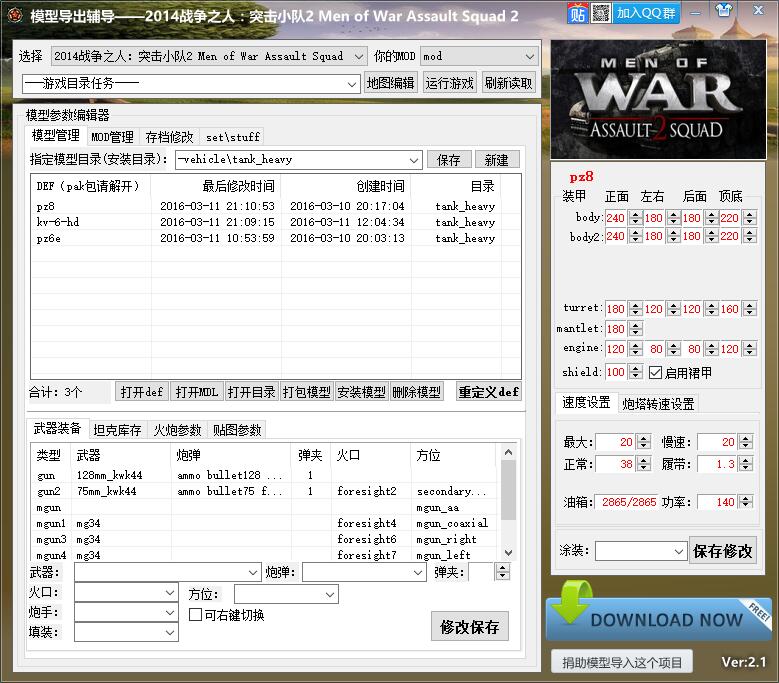
它是什么
mow模型管理(玩家习惯叫 Mow_Tools)是星语软件早年用易语言写的《战争之人》模型管理工具,最后版本为 3.7(2022-08-11)。主要支持原版、AS1、AS2 三个版本,其它版本不再测试。
与后来的 Mow_tank 相比,这一版把模型安装与打包、存档修改、武器与坦克参数编辑、贴图与涂装、MOD 管理都放在同一个界面里。
功能
- 把发布的模型装进自己的 MOD 或他人的 MOD,也可以自由打包模型装到别的 MOD 里;
- 安装时可以只要 obj:不要 MOD 结构,单独提取模型和全部贴图;
- 存档修改的简单功能与 MOD 管理合一,包含 DEF 重定义(即以前发布的「导出辅导助手」);
- 一键打开任务编辑器(打不开时先检查 MOD 是否已经加载);
- 独立修改武器列表、坦克属性与贴图参数,能列出游戏自带的与 MOD 附带的条目;
- 可设置导出的 MOD 目录与游戏目录,导出后自动更新,不必每次手动复制到游戏目录;
- 在线下载 MOD 模型列表:下载模型、交流、提交需求,与手机网站共用,当时的下载走网盘;
- 手动生成炮文件并修改参数,方便校对属性;
- 独立打包任意一个模型,方便交流与安装。
3.7 更新
- 长期累计修正更新;
- 修正存档修改器对战争号令(CTA)的支持,并增加地狱之门(GOH);
- 增加人物士兵模型管理功能;
- 增加 GOH 版本的游戏支持。
更早的更新
- 3.5:新增冷战版本支持。
- 3.3:增加士兵编辑功能。
- 2.9.1:修正游戏更新到 AS2 3.260.2 后无法读取 MOD 目录、无法启动游戏的问题。
- 2.9:安装模型时附带全部枪械、子弹、贴图与 FX 效果文件,减少缺文件与手动复制;增加关联炮弹修改、FX 特效编辑、BMP 转 TGA;继续修正 CTA 兼容,可以读取游戏目录与创意工坊目录。
- 2.8:英文版正式发布,修正 CTA 兼容。
- 2.7:结合旧的通用存档修改器,增加贴图镜片互换、下载模型翻页与评论。
- 2.5:增加教程入口、Tank.inc 快捷修改、GUN 射速计算,修正安装后透明与中文路径问题。
- 2.3:增加搜索、一键建立空 MOD、ext 与 inc 编辑、涂装管理、压缩包拖入直接安装,以及 WOT 与 MOW 贴图互通。
- 2.2:增加视频播放,支持在编辑器里直接粘贴模型。
运行环境
支持 Windows XP / Vista / 7 / 8 / 10 / 11。安装模型、读取 MOD 目录与存档修改都需要对游戏目录有读写权限。
本页资料取自作者 2022 年发布的官方介绍页,版本号、大小与更新内容以该页为准。
What it is
Mow model manager (known to players as Mow_Tools) is the earlier Men of War model tool written by Vlss in E-language; the last release is 3.7 (2022-08-11). It is mainly tested against the original game, AS1 and AS2; later versions are not tested.
Compared with the newer Mow_tank, this build puts model install and packing, save editing, weapon and tank parameter editing, paints and MOD management in a single window.
Features
- Install released models into your own MOD or someone else's, or repack models for another MOD;
- Install obj only: skip the MOD layout and extract just the model with all of its textures;
- Simple save editing combined with MOD management, including DEF redefinition (the old export assistant);
- One-click mission editor (check that the MOD is loaded if it fails to open);
- Edit weapon lists, tank attributes and texture parameters, listing both game and MOD entries;
- Configure the export MOD folder and game folder, then update automatically without copying by hand;
- Online model list: download models, discuss and submit requests, shared with the mobile site (downloads went through a net disk at the time);
- Manually generate gun files and edit their parameters for quick checking;
- Pack any single model for sharing and installing.
What's new in 3.7
- Long-term accumulated fixes;
- Save editor support for Call to Arms (CTA), plus Gates of Hell (GOH);
- Soldier model management;
- Gates of Hell game support.
Earlier releases
- 3.5: Cold War support.
- 3.3: Soldier editing.
- 2.9.1: Fixed the MOD folder and game launch failure after AS2 3.260.2.
- 2.9: Ship all gun, ammo, texture and FX files with installed models; linked shell editing, FX editing, BMP to TGA; further CTA compatibility, reading both game and Workshop folders.
- 2.8: Official English release; CTA fixes.
- 2.7: Merged the older universal save editor; texture lens swapping; paging and comments for model downloads.
- 2.5: Tutorial entry, quick Tank.inc editing, gun rate-of-fire calculator, fixes for transparency and Chinese paths.
- 2.3: Search, one-click empty MOD, ext and inc editing, paint management, drag-in archives, WOT/MOW texture exchange.
- 2.2: Video playback and paste into the editor.
Requirements
Windows XP / Vista / 7 / 8 / 10 / 11. Installing models, reading the MOD folder and editing saves need read/write access to the game directory.
Content on this page comes from the official introduction page published by the author in 2022; version, size and changelog follow that page.