软件说明About this release
它是什么
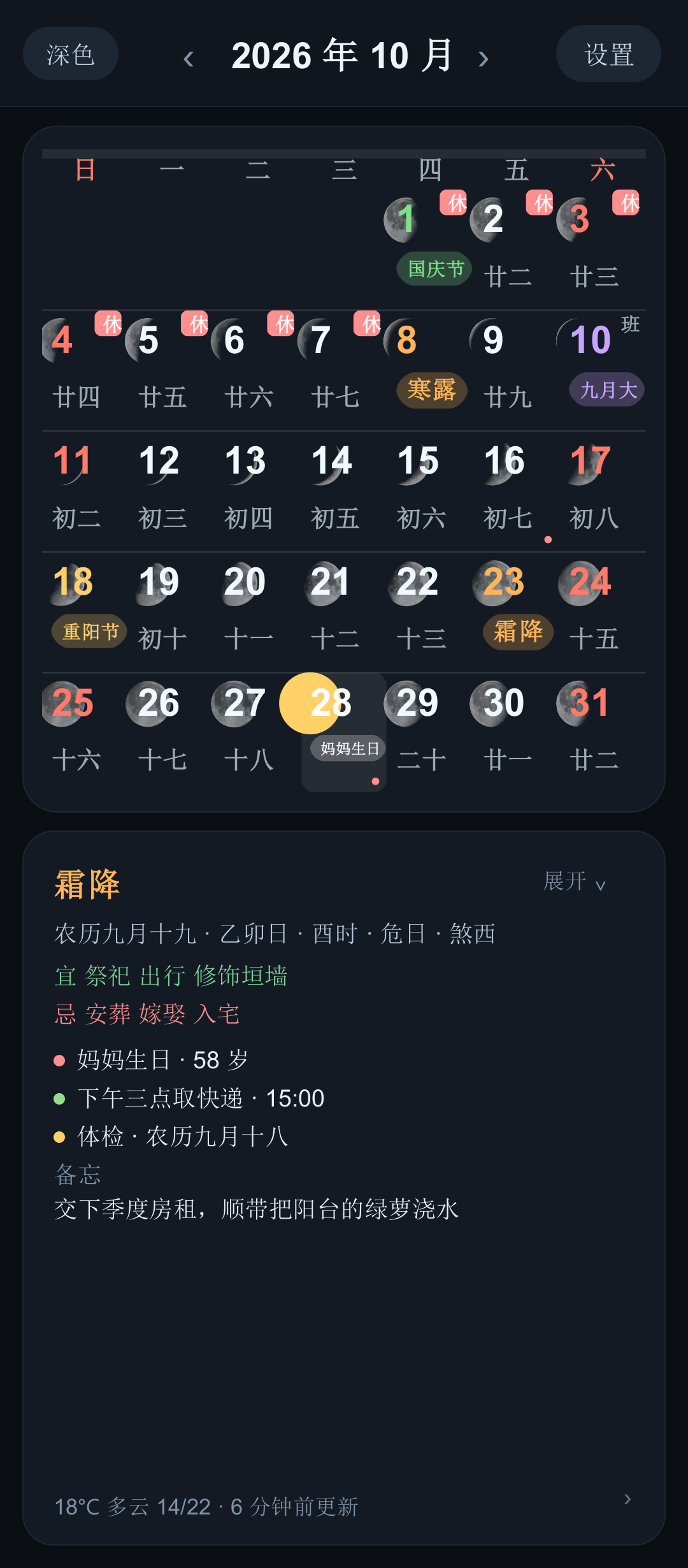
屏幕插件是一组安卓桌面小部件(AppWidget),外加一个自绘的配套 App:月历、天气、农历黄历、倒计时、坐标、潮汐、卫星云图、锁屏时钟,九种组件各自独立、各自可配。
三条硬规矩决定了它的样子:
- 零第三方依赖,整屏自绘,不需要账号、不需要登录、不需要 root;
- App 里预览到的,就是桌面上画出来的——九种组件共用同一份绘制代码,不存在"设置里好看、桌面上变形";
- 数据是外置存储根目录一个看得见的中文 txt,不是藏起来的数据库,你可以自己打开看、自己备份、自己改。
九种组件
| 组件 | 能显示什么 | 风格数 |
|---|---|---|
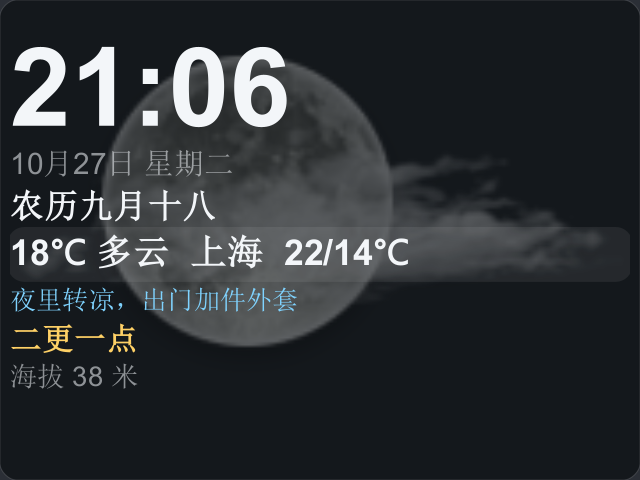
| 内容卡 info | 默认 6 项(时间 / 公历 / 农历 / 时辰 / 天气),另外还能挂提示语、干支、节气、宜忌、倒计时、日程、备忘、更点,共 14 个模块位,长按拖动排序 | 21 套(逐行 9 + 分区版面 8 + 新增 4:晨光渐变 / 杂志封面 / 宣纸信笺 / 夜航仪表) |
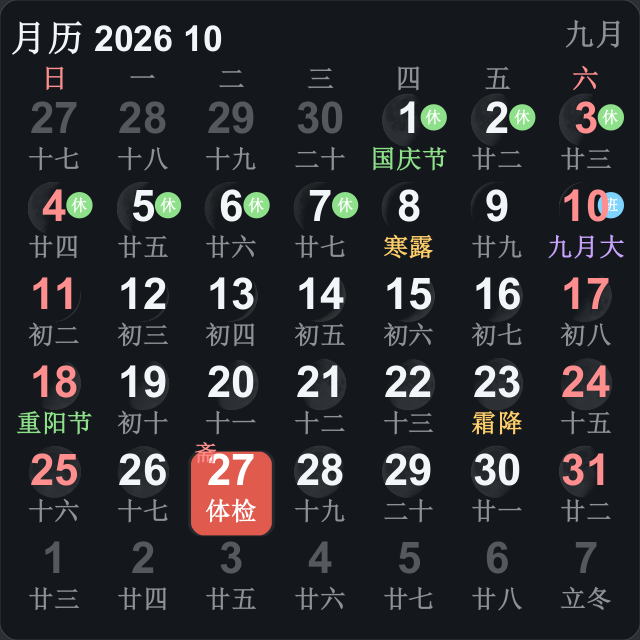
| 月历 month | 7×6 网格,每格垫真实月相照片(随包 28 张),节日 / 节气 / 休班角标,月相大小 60%-300% | 20 套(黄历表格…经典万年历 + 玻璃拟态 / 渐变卡片 / 杂志封面 / 极简点阵 / 和风朱印 / 夜航仪表) |
| 倒计时 cd-one / cd-three | 一屏一条或三条,可按窗口高度自动排 1-5 条;节日 / 节气 / 生日 / 日程支持"每类各排一条" | 5 套 |
| 坐标 coord | 当前经纬度,格子 2×1 / 4×1 / 2×2 / 4×2,点一下复制高德格式坐标 | 4 套版式 |
| 节气表盘 term | 二十四节气环 + 当前节气,只做 4×4 | 3 套版式 |
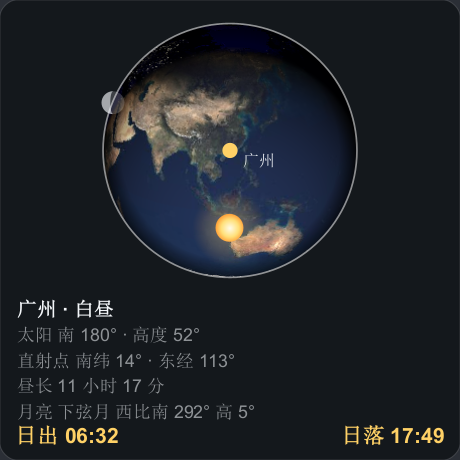
| 日出日落 sun | 日出日落弧 / 光照方位罗盘 / 日弧+月弧 / 日行轨迹地平盘 / 天空侧视轨迹 / 昼夜地球 | 6 套 |
| 潮汐 tide | 天文推算的高潮低潮,可填本地高潮间隙校正 | 3 套 |
| 公转轨道 orbit | 地球公转与四季示意(不按比例) | 3 套 |
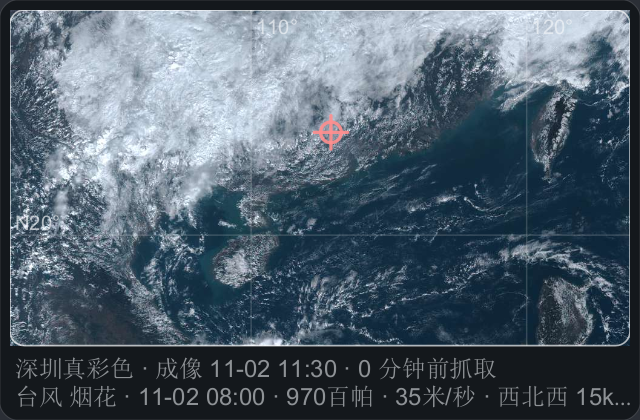
| 卫星云图 sat | 葵花 8 云图(默认,夜里退红外)、真彩色地面+云、NASA GIBS、MSN 四个图源 | 3 套版式 |
每种形态都有 10 组配色(深色 / 浅色 / 彩色 / 暖沙 / 墨绿 / 夜蓝 / 莫兰迪 / 咖啡 / 青瓷 / 极光),尺寸从 2×2 到 4×5,配置按实例存(spec_<id>),同一块月历可以在桌面放两个不同样子的。
本地引擎:不算完不出的数就不显示
农历、干支、节气、宜忌、时辰、更点、月相、日出日落、潮汐、公转轨道全部由内置引擎现算,不联网;农历覆盖 1900-01-31 至 2100-12-31。潮汐按 NOAA 的天文算法推算,可以对某一港校准。
需要联网的只有三样:天气、卫星云图、台风路径。天气走三家免费无 Key 的顺序兜底:Open-Meteo → wttr.in → 挪威气象 MET Norway;城市搜索用 Open-Meteo Geocoding。断网时天气保留缓存并显示"更新于 X 分钟前",云图抓不到就退回文字版。放假调休表内置到 2026 年(自动更新官方公告未做)。
锁屏时钟与提醒
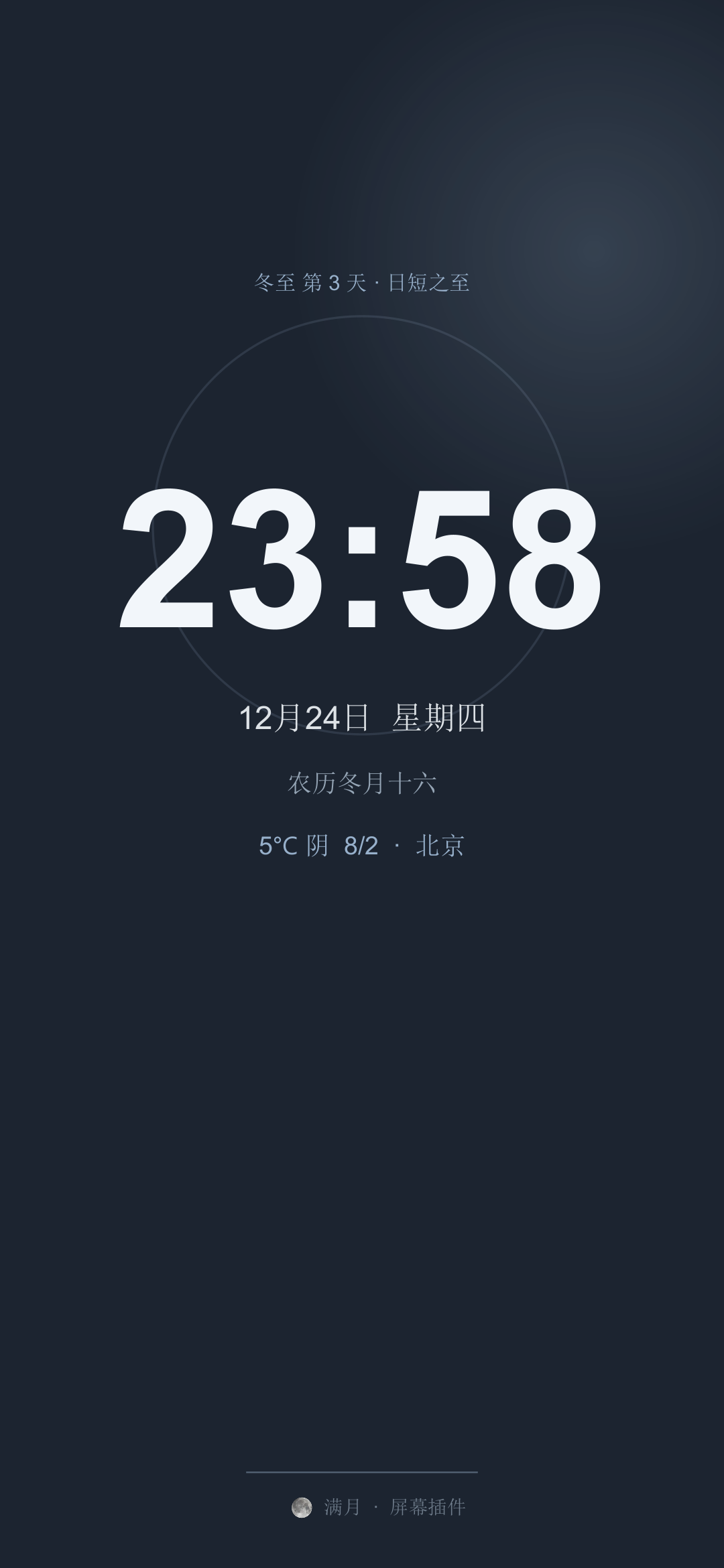
- 锁屏时钟 5 种版式,颜色按当天所处的 24 节气取,可盖系统锁屏、可常亮、可调亮度,也支持当屏保备选;
- 日程与生日:6 种重复规则、5 种提醒方式,生日可提前 0-3 天提醒并自动算岁数;
- 天空事件提醒:日出 / 日落 / 月出 / 月落,档位为 关 / 准点 / 提前 5 / 10 / 15 / 30 / 60 分钟;
- 天气图标 24 张 175×120 PNG,既能当组件里的大图,也能当背景(4 种预设、宽度 20%-200%、不透明度 10%-100%)。
云备份 CloudBox(可选,独立)
这一块的口径很窄也很明确:只上传生日、日程、备忘这三类记录,文件名就是 备忘.txt;用你当前设置的网盘密码做 PBKDF2(12 万次迭代)派生密钥,整份 AES-256-GCM 加密后再传。设置、倒计时、组件配置、坐标一律不上传——所以换手机时恢复的是记录,不是排版。
- 协议是标准 WebDAV(GET / PUT / HEAD / PROPFIND),支持 Nextcloud、ownCloud、群晖、威联通、绿联、InfiniCLOUD、Alist;
- 百度 / 天翼 / 阿里网盘不直连,必须经 Alist 或 OpenList 转成 WebDAV;
- 服务端随包给齐:
CloudBox服务器-Windows.zip是免装 Java 的完整文件夹(含 CloudBox.exe 与裁剪过的 jlink 运行时,约 49 MB);已装 Java 17 就用启动云备份.bat;Linux / macOS 用启动云备份.sh;CloudBox.java/.jar是单文件源码与产物;另有webdav-server.py(纯 Python3 标准库的同类服务器); - 默认端口 8000、账号
backup、密码screenplugin,手机端只填 IP + 端口即可; - 不强制自建——你已有任何 WebDAV 网盘就直接用;
- 从 1.3 起云端只保留最新一份,不再建
.history;改动后自动上传有 20 秒防抖。
怎么用起来
1. 装 APK,打开就是月历首页(整屏自绘,页面栈是 月历 → 当日详情 / 设置抽屉 → 各子页);
2. 加到桌面:设置 → 桌面组件 → 「放到桌面」(Android 8+ 用 requestPinAppWidget 直接钉);系统不支持时长按桌面空白 → 小部件 → 找到「屏幕插件」;
3. 改样式:设置 → 组件风格与排版,选 21 套内容卡风格或 20 套月历风格之一,再挑 10 组配色;长按可拖动模块排序;
4. 精细调:版面编辑器支持拖格、双指捏合缩放、整版平移、撤销 40 步;桌面拖动改变格数时会自动对齐到最近的档位;
5. 透明度与字号:组件背景默认完全无背景,透明度 0-100%、字号 70%-200%、圆角 ±16、字体 4 档、对齐 3 档;
6. 天气:设置 → 天气地区,自动定位或搜城市(拒绝定位也能手动搜);
7. 点组件的行为:点一下进各自的查看页 Viewer(不再直进设置);坐标组件点一下复制高德坐标;
8. 云备份:设置 → 数据与备份 → 网盘与备份 → 添加网盘(自建只填 IP + 端口)→ 测试连接 → 打开「改动后自动上传」。
界面目前只有中文,硬编码;多语言机制(I18n)已经从引擎里提取出来,但词条表还没生成——引擎内部时辰 / 五更的词条已备好 8 列(zh、zh-TW/日、ko、en、ru、es、fr、ar)。
0.4.10 的云图全屏缩放与真彩色地面底图没有上真机验证;四块新组件(节气表盘 / 潮汐 / 轨道 / 云图)与版面编辑器同样无真机验证。
天空事件提醒一次都没有在手机上响过;潮汐只对 NOAA 的查尔斯顿一港做过校准,中国沿海未验。
0.4.8 / 0.4.9 的检查更新未验到真实返回——当时作者站的 Update.asp 与 feedback.html 实测都是 404(页面还没上线),代码路径已按 MoClock 重做。
打赏入口目前仍指向旧地址 facmod.top。
通知权限未申请(targetSdk 28 不需要 POST_NOTIFICATIONS,但升到 33 就要处理)。
云备份没有字段级合并,也不做网盘版本化历史;恢复时是整份覆盖。
未做:农历生日自动展开、桌面长按直接配置组件、官方放假公告自动更新。
版本与包体
0.0.2 起持续迭代到 0.4.10,包体从 122 KB 长到 2.56 MB(增的是随包的月相照片、天气图标与历法数据,不是依赖库)。当前 APK 用 debug key 签名,属自用不上架版本。
版权与联系
版权所有 (C) 1999-2026 vlss(星语)。检查更新走 http://www.vlss.com/Update.asp?ID=ScreenPlugin(ID 是 APK 文件名里不随版本变的那一段);反馈走本站反馈板 http://vlss.com/html/feedback.html。
What it is
ScreenPlugin is a set of Android home-screen widgets plus a self-drawn companion app: month grid, weather, lunar almanac, countdowns, coordinates, tides, satellite imagery and a lock-screen clock - nine widgets, each independent and each configurable.
Three rules shaped it:
- no third-party libraries, everything drawn by the app, no account, no login, no root;
- what you preview in the app is literally what the launcher paints - all nine widgets share one drawing routine, so nothing "looks fine in settings and breaks on the desktop";
- your data is a visible Chinese-named txt in the external storage root, not a hidden database: you can open it, back it up or edit it yourself.
The nine widgets
| Widget | What it can show | Styles |
|---|---|---|
| Info card | Six items by default (time / solar date / lunar date / traditional hour / weather), plus hint text, stem-branch, solar term, almanac notes, countdowns, events, memos and watch periods - 14 module slots, long-press to reorder | 21 (9 per-line + 8 sectioned + 4 new: morning gradient, magazine cover, letter paper, night bridge) |
| Month grid | 7x6 cells, each backed by a real moon-phase photograph (28 shipped), festival / term / holiday badges, moon size 60%-300% | 20 |
| Countdowns | One or three per card, or 1-5 depending on the card height; festivals, solar terms, birthdays and events can each contribute one line | 5 |
| Coordinates | Current latitude / longitude in 2x1, 4x1, 2x2 or 4x2 cells; one tap copies an Amap-format pair | 4 layouts |
| Solar-term dial | 24-term ring with the current term highlighted, 4x4 only | 3 layouts |
| Sun times | Sunrise/sunset arc, illumination compass, sun+moon arcs, solar-path ground plate, sky side view, day/night Earth | 6 |
| Tides | Astronomically computed high and low water, with a local tidal-gap correction | 3 |
| Earth orbit | The seasons diagram (not to scale) | 3 |
| Satellite imagery | Himawari-8 (default, infra-red at night), true-colour ground+cloud, NASA GIBS, MSN | 3 layouts, 4 sources |
Every form has 10 palettes (dark, light, colour, warm sand, ink green, night blue, morandi, coffee, celadon, aurora), sizes from 2x2 to 4x5, and settings are stored per instance (spec_<id>) - you can put two different-looking month grids on the same screen.
The on-device engine
Lunar dates, stem-branch, solar terms, almanac notes, traditional hours, watch periods, moon phase, sun times, tides and the orbit are all computed locally - the lunar range covers 1900-01-31 to 2100-12-31. Tides use NOAA's astronomical method and can be calibrated for one port.
Only three things need the network: weather, satellite imagery and typhoon tracks. Weather falls through three free key-less sources in order: Open-Meteo, wttr.in, MET Norway; city search uses Open-Meteo Geocoding. Offline, weather keeps the cache and shows "updated X minutes ago"; imagery falls back to the text version. Public-holiday data is built in through 2026 (automatic updates from official notices are not implemented).
Lock screen and reminders
- Five lock-screen clock layouts, coloured by the current solar term, able to overlay the system lock screen, stay on or dim, and usable as a screensaver fallback;
- Events and birthdays: 6 repetition rules, 5 reminder styles, birthdays can warn 0-3 days ahead and the age is computed;
- Sky-event reminders: sunrise, sunset, moonrise, moonset, at off / exact / 5 / 10 / 15 / 30 / 60 minutes;
- 24 weather icons at 175x120 PNG, usable as the widget's large image or as a background (4 presets, width 20%-200%, opacity 10%-100%).
Cloud backup (CloudBox, optional)
Deliberately narrow: only birthdays, events and memos are uploaded, into a file literally named 备忘.txt. Your current cloud password is stretched with PBKDF2 (120,000 rounds) and the whole file is encrypted with AES-256-GCM before upload. Settings, countdowns, widget layouts and coordinates are never uploaded - so a new phone gets your records back, not your arrangement.
- The protocol is standard WebDAV (GET / PUT / HEAD / PROPFIND): Nextcloud, ownCloud, Synology, QNAP, UGREEN, InfiniCLOUD and Alist are supported;
- Baidu, China Telecom and Aliyun are not connected directly - route them through Alist or OpenList as WebDAV;
- The server ships four ways:
CloudBox服务器-Windows.zipis a complete folder needing no Java (CloudBox.exe plus a jlink-trimmed runtime, about 49 MB); use启动云备份.batif Java 17 is installed;启动云备份.shfor Linux/macOS;CloudBox.java/.jarare the single-file source and build; andwebdav-server.pyis the same server in pure Python 3 stdlib; - Defaults are port 8000, user
backup, passwordscreenplugin; on the phone you only enter IP and port; - Self-hosting is not mandatory - any WebDAV drive works;
- Since 1.3 the cloud keeps only the latest copy (no
.history), and auto-upload debounces 20 seconds after a change.
Getting started
1. Install the APK - it opens on the month screen (fully self-drawn; the stack is month -> day detail / settings drawer -> sub-pages);
2. Add to the desktop: settings -> widgets -> "place on home screen" (Android 8+ uses requestPinAppWidget); otherwise long-press the wallpaper -> widgets -> ScreenPlugin;
3. Style it: pick one of the 21 card styles or 20 month styles, then a palette; long-press to reorder modules;
4. Fine-tune: the layout editor supports dragging cells, pinch zoom, panning the whole layout and 40 undo steps; resizing a widget on the desktop snaps to the nearest supported size;
5. Transparency and size: widget backgrounds are fully transparent by default, with opacity 0-100%, font 70%-200%, corner radius +/-16, 4 font steps and 3 alignments;
6. Weather: settings -> region, either automatic location or search (manual search works even if you deny location);
7. Tapping a widget opens its own viewer page rather than settings; the coordinate widget copies an Amap pair;
8. Cloud backup: settings -> data & backup -> drives -> add drive (self-hosted needs only IP and port) -> test connection -> enable "upload after changes".
The interface is Chinese-only today, hard-coded. The I18n layer was extracted from the engine but the string table is not generated yet - the engine already carries 8 columns for hours and watch periods (zh, zh-TW/JA, ko, en, ru, es, fr, ar).
The 0.4.10 full-screen imagery zoom and the true-colour ground layer were never tested on a device, and the four new widgets plus the layout editor have no real-device verification either.
Sky-event reminders have never actually rung on a phone; tides were calibrated against one NOAA port (Charleston) and not against Chinese coasts.
The 0.4.8 / 0.4.9 update check never saw a real response: at that time the author site's Update.asp and feedback.html both returned 404 (the pages were not deployed). The code path was rebuilt to match MoClock.
The donation entry still points at the old facmod.top address.
Notification permission is not requested (targetSdk 28 does not need POST_NOTIFICATIONS, but raising it to 33 will).
Cloud backup has no field-level merge and no versioned history on the drive - restoring overwrites wholesale.
Not implemented: lunar birthdays expanding automatically, configuring a widget by long-pressing it on the desktop, automatic holiday-notice updates.
Versions and size
Continuous work from 0.0.2 to 0.4.10; the package grew from 122 KB to 2.56 MB - the increase is shipped moon-phase photographs, weather icons and calendar data, not dependency libraries. Releases are signed with a debug key: private use, not for store listing.
Copyright and contact
Copyright (C) 1999-2026 vlss (Xingyu). The update check reads http://www.vlss.com/Update.asp?ID=ScreenPlugin (the ID is the part of the APK name that never changes), and feedback goes to this site's board at http://vlss.com/html/feedback.html.