软件说明About this release
它是什么
Mow_tank 是《战争之人》系列(含突击小队 2、战争号令、冷战、钢铁之师、地狱之门)的坦克模型打包 / 安装工具
核心承诺只有一句:包格式与原版逐字节兼容。旧版生成的包这里可以直接装,这里生成的包旧版也能读;未修改的段一律按原始字节回写,不做重新编码。
这一条不是嘴上说的,是拿真东西测出来的(2026-11-01):从桌面上 20 个 RAR 里解出 34 个原版工具打的 .mow_vlss(含 [AS1 2] 与 [CTA] 两套版本、舰载武器、飞机、炮台,最大 276 MB)逐个跑两类测试——
- 格式保真:
--probe解析后原样重建,34/34 逐字节一致; - 安装 → 重新打包 → 再安装:逐文件
cmp,18 个可比包里 16 个完全等价,另 2 个只差极少量文件;再打包出的包裹与原包 3 个逐字节完全相同、27/31 差 <0.1%、30/31 差 <1%(最大 6.07%)。
过程中按真实包裹修掉 9 处归类 / 收文件缺陷,并发现一个真 bug:原版把空的 [ammo] 段写成单标记(只有开没有闭),旧解析器找不到收尾就把后面所有段全吞进这一段——mk49 这种"炮 + 弹药"包安装时只写出 2 个文件(89 字节)。现在按"下一个已知段标记 / 容器结束标记"断开并记住"无收尾",mk49 解析出 15 段、安装写出 27 个文件(3 MB)。
- 单文件程序,复制到任意目录即可运行,不需要安装;
- 首次启动在同目录生成
conn.ini(GBK 编码,[配置]段与原版共用,旧文件可直接沿用)和logs\; - 不发起任何网络请求,也不读写游戏存档——存档修改与在线下载这两块已整体移除。
六个页签
| 页签 | 做什么 |
|---|---|
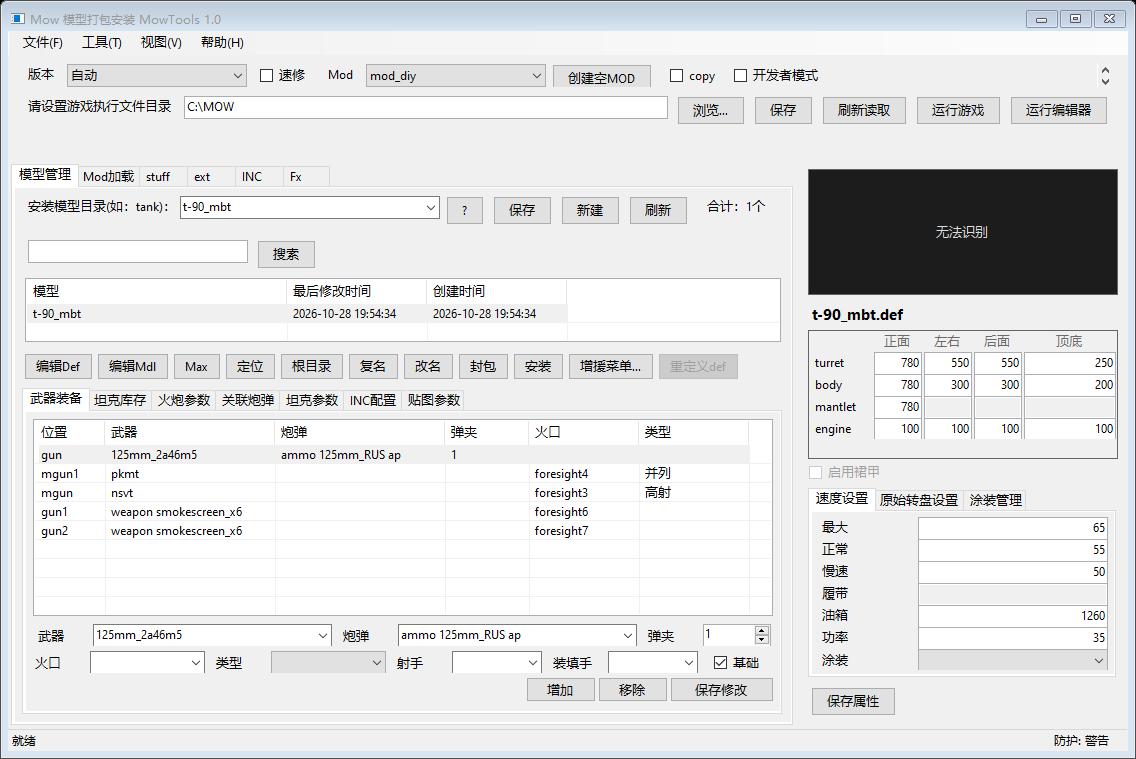
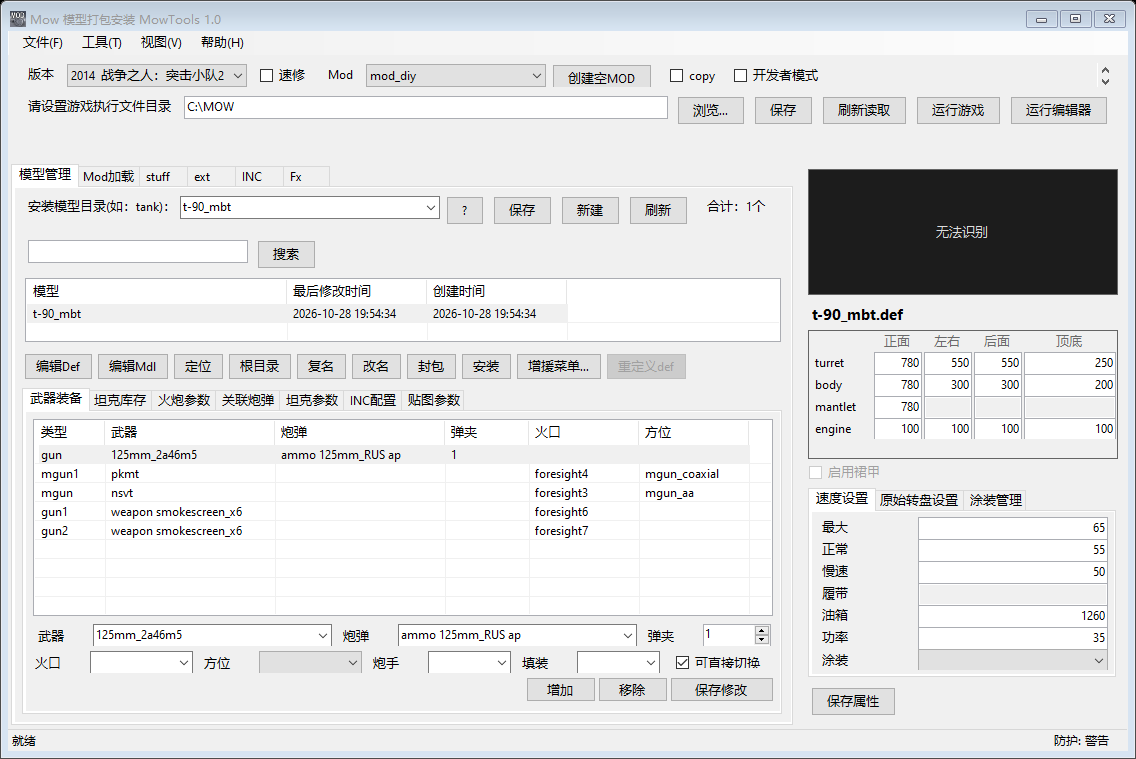
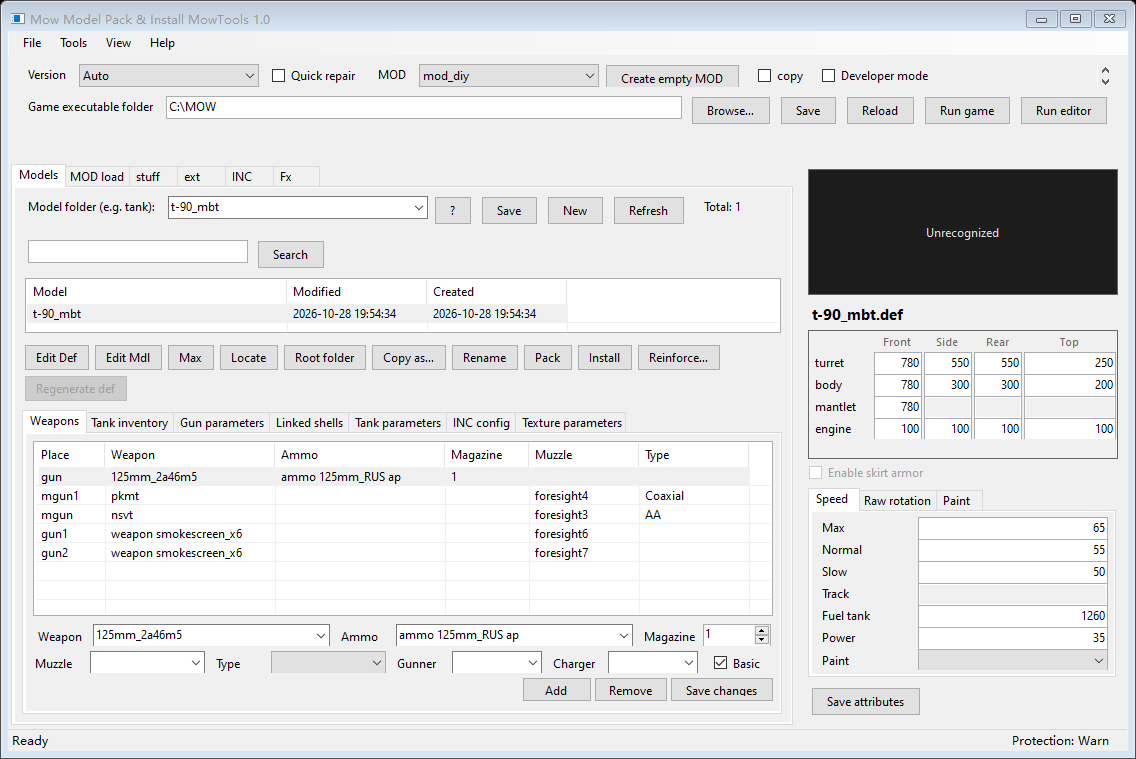
| 模型管理 | 以 .def 为单位列出模型(名称 / 最后修改 / 大小 / 目录 / 创建时间),按分类目录筛选、关键字搜索;操作在右键菜单和列表下方一排可见按钮里:编辑 Def/Mdl、定位、根目录、复制名称、改名、封包、批量封包、安装模型、增援菜单、删除模型、重定义 def、刷新、设置。双击 Def/Mdl 直接打开。几万个模型也不卡(虚拟列表,只画可见行) |
| Mod 加载 | 按游戏用户名(profile)列出 MOD,勾选后「保存选择」写入 options.set;导入 / 导出 / 删除 MOD、编辑 mod.info、复制 MOD |
| stuff | 全图形化武器 / 弹药编辑:左边列 gun / weapon / ammo / shell 文件,右边按该文件实际内容生成参数表(基本数值 / 全部数值 / 文本 / 开关四页)。页签上方新增搜索参数框,按键名或中文显示名即时过滤、四页一起生效,右侧显示"匹配 N / 共 M 项";保存只替换改动过的片段,注释、缩进、编码与其它字节原样保留 |
| ext | 任意文本文件的查找 / 替换 / 插入 / 删除 / 保存,保留原编码,可区分大小写 |
| INC | 列出 .inc,编辑后保存,打开 INC 目录 |
| Fx | 批量把 FX 目录里的 .bmp 转成 32 位未压缩 .tga(已是新 TGA 的自动跳过) |
模型管理下方 7 个子页签随选中模型 / 挂载自动填充:武器装备、坦克库存、火炮参数(九行参数区外套了滚动面板,窗口矮的时候"穿透 / 飞行速度"以下不再被裁掉;按钮行新增定位文件,直接在资源管理器里选中这把炮的 set\stuff\gun\<名字>)、关联炮弹(同样加了定位文件——.ammo 分散在 shell / ammo / -ammo 与游戏官方目录里,混排时靠路径找太费劲)、坦克参数、INC 配置(语法着色)、贴图参数(含安装 / 打包 / 删除涂装)。
封包、批量封包与测试任务
封包只打当前选中的那一台坦克:按 .def 的武器链自动追踪枪管 → 炮弹 .ammo → 弹药模型目录,外加载具音效、弹道特效、本模型 INC 段落、界面图标与贴图,包结构与原版 .mow_vlss 逐字节一致。选好输出位置后会像原版一样问是否要压缩,默认高亮你上次的选择。
批量封包(操作行与右键菜单里都有)把当前列表里看得见的模型逐台打成独立包裹,一次选目录、每台一个 <模型名>.mow_vlss:口径跟着列表走(先按分组筛、再按搜索框筛,可以搜 -tank 只打坦克);不同分类里同名的两台不会互相覆盖(第二台自动带分类名);中途可以取消,只停掉还没开始的,已打完的都留着;任何一台失败只记进最后的清单、继续打其余的。命令行同一套代码:--pack <MOD目录> --each --outdir <目录> [--group <分类>] [--compress]。
测试任务(右键「插入测试任务 A(map\1\0.mi)/ B(map\1\99.mi)」)把选中的单位写进 MOD 自己的 resource\map\1\ 任务文件,进游戏选测试图「1」就能直接把车开出来,不用自己在编辑器里摆。写法照官方文件对过:外层骨架来自游戏自带的 resource\map\1\1.mi,单位块来自官方任务 skirmish_units(tutorial).mi(用 --pak 从 map.pak 里读出的真件)。游戏目录永远不动;同一台重复插入不产生两份;目标文件已存在但不是任务格式时先备份成 .bak 再重写;命令行 --test-mission <MOD目录> --name <单位> [--slot 0|99] [--player N]。
安装:拖进去就行
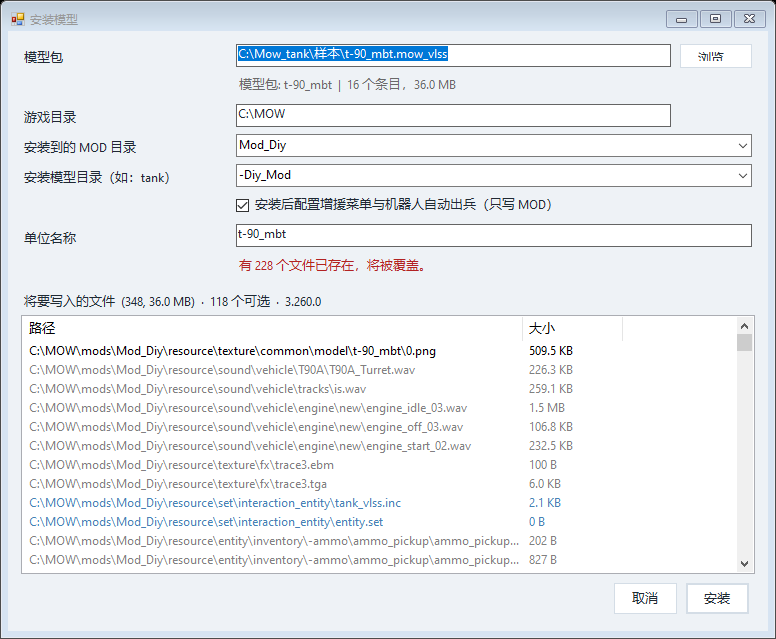
图形界面六步:选包文件 → 选游戏目录 → 选装进哪个 MOD(默认 Mod_Diy,可下拉选已有、也可直接输新名字)→ 填模型目录名(默认取包名)→ 填单位名称(游戏里显示的文字名,写进 MOD 的 localization\desc.lng)→ 检查「将写入的文件」清单(已存在的标成冲突色)。有共用资料时先弹「可选输出文件」并默认全部勾选。
拖放安装:先把游戏目录和 MOD 选好,再把文件拖进主窗口任意位置。.mow_vlss / .mow_bak 与内含包 / MOD 目录的 .zip / .7z / .rar 都能丢进来;压缩包里直接是 MOD 目录时按兼容规则摊进当前 MOD,外层多套的同名目录自动剥掉;直接拖入一个 MOD 文件夹则复制成 mods\ 下的新 MOD 并补齐 mod.info。
兼容安装:模型自己的文件照常写入或覆盖;武器、炮弹、弹药、音效这些全局共用资源只在缺失时补齐,目标已存在就保留原文件,不会因为装第二台车改掉第一台车引用的武器参数。
坏包名的防护(包是别人做的,条目名可能不规范):名字里带 .NET/Windows 不接受的字符(引号、尖括号、竖线、控制字符)→ 换成下划线并记一条警告,其余条目照常装;名字写成 ..\..\ 或绝对路径想写到这个 MOD 外面 → 直接丢掉并记警告,绝不落盘到 MOD 外面;原版资源包里混过"名字前面垫几千个 0x00"的条目(真实包 chieftain 里 entity\fx\skill\skill1.def 前面垫了 3747 个 0x00),以前这种包一装就抛 Illegal characters in path 整次安装炸掉,现在按真名取回,同一个包从 451 个文件变成 454 个文件、0 警告。处理结果都显示在"安装成功"的框里(! 开头的行)和 --install 的输出里。
跨版本自动兼容
AS2 模型装进战争号令 / 冷战 / 地狱之门时,参数名、文件路径和弹药写法都可能对不上。安装器在这三个引擎上默认自动修正(AS2 本体、突击小队不需要,也不会改动):核心 DEF 的 include 路径按目标 gamelogic.pak 里的实际文件重新映射,找不到替代的整行注释并留 ; [compat] … 说明;武器与弹药按目标官方同类表匹配改名,实在没有对应项的只移除该字段;安装时从目标自己的 resource\entity\*.pak 抽样官方 DEF(最多 192 个)做参数对照,MOD 里出现而目标官方从未使用的参数块单列为"官方未使用"、原样保留;目标 gamelogic.pak 全程只读;结束先汇总数量再打开兼容性检查窗口逐条列出文件、行号、参数、原写法与结果,可另存 compat_report.txt。需要原样安装时命令行加 --no-compat;只读检查走右键「兼容检查」或 --compat-check,任何版本都能用、绝不写盘。
地狱之门的征服增援
GoH 的增援菜单、研究解锁和 AI 出兵是另一套数据结构,不能套用 AS2 的 vehicles.set + bot.data.lua 方法。安装完成后自动弹出征服增援设置(地狱之门):选国家(只列官方表里真实存在的阵营)、选一个官方同类单位作模板、填单位 id / 显示名 / 价格,勾选是否写研究阶段、是否加入 AI 出兵。条目按目标游戏官方写法克隆,只替换单位 id、("v" "模型") 引用和价格;官方数据从 gamelogic.pak 只读提取,所有写入都落在 MOD 自己的 set / lua 副本里。删除模型时会同步清掉这几处条目、恢复官方原文。
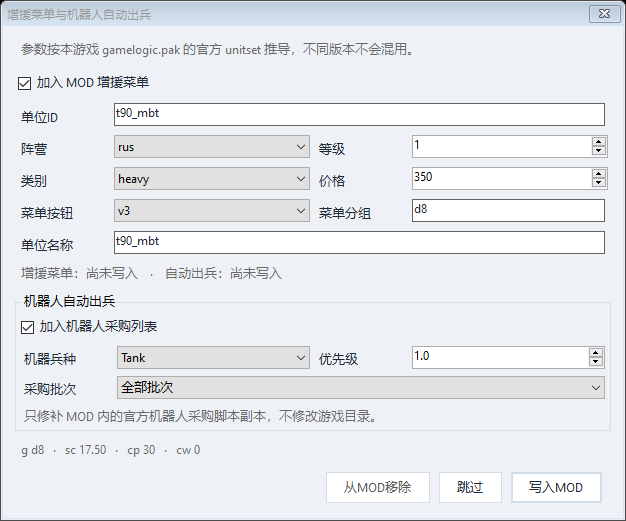
AS2 与冷战、战争号令走 unitset + 机器人采购:生成 / 更新 MOD 内的 vlss_units.set 并挂到 MOD 自己的 vehicles.set 上,玩家和机器人读同一份单位表,整个过程不写游戏本体任何文件;阵营、类别、等级、价格、菜单按钮、分组、单位名称以及机器人的兵种类别、优先级、采购批次都可自由改写,再次打开时从 MOD 已有条目回填。
不冻界面
打包(含压缩)、整个 MOD 备份、安装写盘与跨版本校正现在都跑在后台线程上,中间弹一个小进度窗:显示当前在哪一步(正在打包哪台 / 正在写出 / 正在压缩 / 正在按目标版本校正引用)、已经过了多少秒,批量打包还带 第 x / 共 y 台。实测一台 56MB / 217 文件的坦克:不压缩约 0.7 秒、压缩约 3.1 秒——以前这段时间整个窗口是死的(不重绘、不响应),现在界面照常刷新。
大 MOD 不卡
- 模型列表虚拟列表 + 目录并行扫描 + 内存缓存:2 万个模型约 0.8 秒读完;
- 取行不再读文件:以前每次重画一行都去解析那台单位的
.def取"类型"(而类型列在原版里是隐藏的),点"大小"列头排序时整屏新行一起解析,就是那一下的卡顿。现在类型只在真正需要时(增援窗口)才解析,每行的ListViewItem建一次就复用,图标路径每个模型只探测一次; - 文件树扫描按层并行:4 万个文件约 0.8 秒,缓存 30 秒;
- 启动只建模型页 + 挂载表那一页,其它五页与七个子页签第一次切过去才构造;扫描本机游戏安装挪到窗口出现之后,游戏装在移动硬盘 / 网络盘或盘已拔掉时不会再挡在主窗口前面——实测"进程启动到主窗口出现"从 3.9 秒降到 1.75 秒(多次量测 1723 / 1748 / 1749 / 1750 / 1780 / 1795 ms),分段耗时每次启动写进
logs\run-*.log的startup:行,一段一段能对; - MOD 编辑器文件列表同样是虚拟列表,4 万文件约 2 秒打开。
有三条看着能省的路被真量过、结论是都不划算,也一并记在文档里:外层四行 TableLayoutPanel 换直接停靠(531ms → 531ms,那 0.5 秒是控件树本身不是布局数学);跳过主题着色递归(总时长不变);模型页等窗口出现后再建(主窗口 1750ms → 545ms 就出来,但列表就绪反而变 2230ms,中间还有一次像卡死的空白,不做)。
再打包不漏文件
逐字节比包裹只能说明"格式对",说明不了"内容没少"。所以另加一个更贴近用途的口径:原包装出来的 MOD 与 再打包→再安装出来的 MOD,两边文件树逐个对比(路径 + 大小)。按这个口径查出并修掉五类缺陷:弹药目录再套一层就不认(chieftain 原包 188 条只剩 119 条)、炮弹的粒子实体漏掉(11 个文件)、.dds 图标两头不管(8 个文件凭空消失)、音效文件名大小写被改写(m256 vs M256.wav,Windows 看不出差别但 Linux/Proton 下会找不到)、段尾标记被当成贴图内容(凭空多出一个假 unit_icon2\<模型>_03.tga)。修完这一批,34 个真实包裹的装载等价结果是 33 个完全一致;剩下 1 个(ddg-1000)两边文件一一对应、大小全等,只是弹药目录写法差一个大小写,Windows 不分大小写、不影响游戏,留作已知差异。
语言、主题、字号与命令行
默认英语 + 自动识别系统语言(中文系统自动切中文),菜单 File → Language 或设置页可强制指定,切换后界面就地刷新。当前 14 种界面语言:English、简体中文、Русский、Українська、Deutsch、Français、Español、Italiano、Polski、Português (Brasil)、Čeština、Türkçe、日本語、한국어。
界面主题可选跟随系统(默认)、浅色、深色、钢灰、暖色,选择后主界面、安装器、MOD 编辑器、增援设置等窗口一起换色、不需要重启。设置页另有界面字体与字号两项(默认 Segoe UI 9pt,字号 8-16pt 可选、实际夹在 6-24),改完已开着的窗口就地换字体;标题字号自动 +2 号加粗,stuff / INC 编辑器的等宽字体只跟着改字号、不换字族。注意字号调大后按默认字号排好的行会重新流式换行,个别固定宽度的下拉框会显挤。
Mow_tank.exe                                 启动图形界面
Mow_tank.exe --probe <file>                  打印包结构(段、条目、尾部贴图),不写盘
Mow_tank.exe --selftest [file]               兼容性自检(无参数时用内置样本)
Mow_tank.exe --pack <dir> --name <n> --out <file> [--compress]
Mow_tank.exe --pack <MOD目录> --each --outdir <目录> [--group <分类>] [--compress]   批量封包
Mow_tank.exe --install <pkg> --game <dir> [--mod <名>] [--group <目录>]
             [--display <单位名>] [--optional] [--yes] [--no-compat]
Mow_tank.exe --reinforce <modDir> --game <dir> --name <unit>
             [--side rus] [--category medium] [--button v3] [--level 1]
             [--cost 350] [--bot] [--remove]
Mow_tank.exe --reinforce <modDir> --game <dir> --name <unit> --ref <官方单位>
             [--side ger] [--cost N] [--bot] [--no-research]      地狱之门(征服增援)
Mow_tank.exe --test-mission <modDir> --game <dir> --name <unit> [--slot 0|99] [--player N]
Mow_tank.exe --list --game <dir>             列出识别到的版本与 MOD
Mow_tank.exe --compat-check <modDir> --game <dir> [--model <名称|file.def>]
                                             只读兼容检查:不写盘、不出报告
命令行输出为 GBK;重定向到文件时用 iconv -f GBK -t UTF-8 查看。
怎么用起来
1. 把 Mow_tank.exe 放到任意目录双击运行(不需要安装,.NET 4.x 是 Win10/11 自带的);
2. 顶部第二行填游戏执行文件目录(游戏根目录),点「保存」——版本列表只列本机实际已安装的作品;
3. 顶部选版本与目标 MOD(默认 Mod_Diy),把 .mow_vlss / .zip / 模型 MOD 文件夹直接拖进主窗口;
4. 核对「将写入的文件」清单,共用资料默认全部带上,确认后点安装;
5. 要让这辆车出现在游戏增援菜单里:点增援菜单…,填阵营 / 等级 / 价格 / 按钮分组,勾是否给机器人出兵,保存;
6. 想快速试车:模型列表右键「插入测试任务 A」,进游戏选测试地图「1」就能开出来;
7. 改乱了想核对,用工具菜单的兼容检查(当前 MOD)或右键「兼容检查」,只读不写盘。
游戏内实测只走完一半:把 8 个包(btr-90 / df21c / cvn-65 / f14d / mk49 / bm-30_smerch / c-5 / Avro_Vulcan)装进独立 MOD Mod_test 启用后启动游戏,读游戏自己的 game.log 抓到一条真问题——MOD 'Mod_test:0' 无法使用:未安装,原因是 mod.info 的 {name} 大小写(原版都是"目录 Mod_Diy / 名字 mod_diy")。本工具现在新建 mod.info 时把 {name} 按小写登记(自检 O15/O16),改完后日志里不再出现这条错误。但"单位能在游戏里开出来"这一步没有看到画面:那两次启动都停在 Cannot initialize the DXGI adapter #0(本机显卡上下文被前一次强杀占用),需要你那边确认一遍。测试任务写进 map\1\0.mi 后能不能刷出车,同样因此未验。
CTA / 冷战 / 地狱之门的跨版本修正与 GoH 征服增援,是用构造的 gamelogic.pak 样本跑通自检(X1–X14、G1–G10)的,尚未在真实游戏里装车验证;参数映射全部按目标 pak 实际内容读取,没有写死表项。
MOD 启用块 {mods}:字节级拼接,只在 options.set 里定位 {mods …} 块,其余字节原样保留,首次改写前生成 options.set.backup;构造样本已验证中文 MOD 名、UTF-8 内容保留、重复启用禁用幂等,但本机 AS2 profile 里本来没有该块,没有拿到游戏真实写出的样本做端到端比对,第一次勾选 MOD 后请进游戏确认。
地图编辑器热键:设置里可选 F1–F12(默认 F2),但当前版本尚未挂全局键盘钩子,热键只被保存、不会真的替你按键;在编辑器里插入模型请手动按 F2。
stuff 页:复合结构块({inventory …}、多标签 {tag …})保持只读原样,需要时到 ext 页或 MOD 编辑器里改文本。
3DMAX 模型导入、独立 FX 粒子 / 贴图预设编辑器、人物 portrait PSD 未复刻;这些文件仍可通过文本编辑、替换文件或外部程序处理。
.7z / .rar 直接导入依赖本机已装的 7-Zip 或 WinRAR;.zip 用内置实现。
界面「跟随系统」在 Windows 7 上只有浅色一套(Win10/11 才会跟随深色设置)。
在线功能(更新检查 / 在线下载)未实现且已从界面移除,程序不发起任何网络请求。
自检规模:161 项以上,覆盖包往返、段分类、安装落点、entity.set 追加、MOD 启用改写、.def 装甲 / 速度 / 裙甲按偏移写回、武器挂载整块重建、增援注入、共用资源保留、空目录全版本安装、图形化参数表字节保留、跨版本修正 X1–X14、地狱之门征服增援 G1–G10、装载等价 P55–P89、mod.info 小写名 O15/O16 等。防护默认 Warn 级(检测到调试器 / 注入时提示并记日志,不阻止使用),可在设置里改为 Block 或 Off。
版权
程序与包格式由 vlss 编写并持有版权,允许自由使用、修改、再分发。随附开源组件清单见包内 THIRD_PARTY_NOTICES.md,程序内「帮助 → 关于 → 开放源代码许可」同样可查看。本工具不含存档修改,也不含在线下载 / 更新 / 评论;程序不发起任何网络请求。
What it is
Mow_tank is a tank model packer and installer for the Men of War family (Assault Squad 2, Call to Arms, Cold War, Steel Division, Gates of Hell).
One promise: the package format stays byte-compatible with the original. Packages made by the old tool install here, packages made here can still be read by the old tool, and untouched sections are written back from their original bytes.
That claim was measured, not asserted (2026-11-01): 34 real .mow_vlss packages unpacked from 20 RARs on the desktop (both [AS1 2] and [CTA] versions, ship weapons, aircraft, turrets, up to 276 MB) went through two test passes -
- format fidelity: parse with
--probeand rebuild as-is - 34/34 byte-identical; - install -> repack -> reinstall: file-by-file
cmp- 16 of 18 comparable packages fully equivalent, the other two differing by very few files; repacked packages vs originals: 3 byte-identical, 27/31 within 0.1%, 30/31 within 1% (worst 6.07%).
Nine classification bugs were fixed along the way, plus one real defect: the original writes an empty [ammo] section with an opening marker only, and the old parser, finding no closer, swallowed every later section into it - mk49 installed just 2 files (89 bytes). The parser now breaks on the next known section marker and remembers "unclosed", so mk49 yields 15 sections and installs 27 files (3 MB).
- One portable file, no installation;
- first start writes
conn.ini(GBK; the[配置]section is shared with the original so an old file carries over) andlogs\; - it makes no network requests and never touches game saves - save editing and online download were removed entirely.
Six tabs
| Tab | What it does |
|---|---|
| Models | Lists models per .def, filters by category folder, searches by keyword; actions in the right-click menu and a visible button row (edit Def/Mdl, locate, root, copy name, rename, pack, batch pack, install, reinforcement menu, delete, redefine def, refresh, settings). Tens of thousands of rows stay smooth |
| Mod loader | Lists MODs per game profile, "save selection" writes options.set; import / export / delete, edit mod.info, copy |
| stuff | Fully graphical weapon and ammo editing: files on the left, a parameter table built from that file's real content on the right (basic / all / text / switches). A new search box filters by key name or Chinese display name across all four tabs, showing "matched N / total M". Saving replaces only edited fragments |
| ext | Find / replace / insert / delete / save in any text file, original encoding kept |
| INC | Lists .inc, edit and save, open the folder |
| Fx | Batch-convert .bmp to 32-bit uncompressed .tga |
Seven sub-tabs follow the selection: weaponry, tank inventory, gun parameters (the nine rows now sit inside a scroll panel so "penetration / muzzle velocity" are no longer clipped on short windows, and a new locate file button opens this gun's set\stuff\gun\<name> in Explorer), linked shells (same locate button - .ammo files are scattered across shell, ammo, -ammo and official folders), tank parameters, INC with syntax colouring, and textures (install / pack / delete paint).
Packing, batch packing, test missions
Pack covers only the selected tank, following the weapon chain barrel -> shell -> ammo model folder plus vehicle sounds, ballistic effects, this model's INC blocks, icons and textures - structurally identical to an original package. It asks whether to compress and remembers your last choice.
Batch pack packs every model currently visible in the list, one package each, into one chosen directory: the scope follows the list (filter by group, then by search, so -tank packs only tanks); same-named models in different categories do not overwrite each other (the second gains the category name); Cancel stops only what has not started; a failure is recorded in the final list and the rest continue. Same code behind --pack <mod> --each --outdir <dir> [--group <cat>] [--compress].
Test missions (right-click "insert test mission A (map\1\0.mi) / B (map\1\99.mi)") write the selected unit into the MOD's own resource\map\1\ mission file, so you can drive the tank out of test map "1" without placing it in an editor. The format was matched against official files: the outer skeleton comes from the game's own 1.mi, the unit block from the official skirmish_units(tutorial).mi read out of map.pak with --pak. The game directory is never touched; re-inserting the same unit does not duplicate it; a non-mission file is backed up to .bak first. CLI: --test-mission <modDir> --name <unit> [--slot 0|99] [--player N].
Installing: just drop the file
Six steps: pick the package -> pick the game folder -> pick the target MOD -> model folder name -> unit name (written to the MOD's localization\desc.lng) -> review "files to be written". Shared assets are offered pre-ticked.
Drag and drop anywhere once the game folder and MOD are selected: .mow_vlss / .mow_bak, archives containing packages or MOD folders, or a MOD folder directly. Compatible install writes the model's own files but only fills gaps in shared weapons, shells, ammo and sounds, keeping existing target files.
Bad entry names are handled (packages are made by other people): characters .NET/Windows rejects become underscores with a warning and the rest still installs; entries pointing outside the MOD (..\..\ or absolute) are dropped with a warning and never written outside; the original packs contain entries padded with thousands of 0x00 bytes (in the real chieftain package, entity\fx\skill\skill1.def is preceded by 3747 of them) which used to abort the whole install with Illegal characters in path - now the real name is recovered and that package goes from 451 to 454 files with zero warnings. All of it is listed in the success dialog (lines starting with !) and in --install output.
Automatic cross-version fixes
On Call to Arms, Cold War and Gates of Hell the installer fixes DEF include paths against the target's gamelogic.pak, comments unusable macros with a ; [compat] note, renames weapons and shells to the target's official equivalents, samples up to 192 official DEFs to flag parameter blocks the target never uses, keeps the target pak read-only throughout, and produces a compatibility report window plus compat_report.txt. Use --no-compat for a literal install; --compat-check is read-only on every version.
Gates of Hell conquest reinforcements
GoH uses a different structure for its reinforcement menu, research unlocks and AI spawning. After installing, the conquest dialog opens: choose a nation (only real factions), pick an official unit of the same kind as a template, fill id / display name / cost, tick research stage and AI purchasing. Entries are cloned in the target's official style; official data is read-only from gamelogic.pak and every write lands in the MOD's own set / lua copies. Deleting a model restores the official text.
AS2, Cold War and Call to Arms use unitset + bot purchasing via vlss_units.set attached to the MOD's own vehicles.set, never writing into the game itself, with every attribute editable and read back.
The UI no longer freezes
Packing (including compression), whole-MOD backup, install writes and cross-version fixes now run on background threads behind a small progress window showing the current step and elapsed seconds, with item x / y for batches. Measured on one 56 MB / 217-file tank: about 0.7 s uncompressed, about 3.1 s compressed - previously the window was dead for that whole time.
Large MODs stay fast
- Virtual model list with parallel scanning and caching: 20,000 models in about 0.8 s;
- rows no longer read files: previously every repaint parsed that unit's
.deffor a "type" that is hidden in the original, so sorting by size parsed a whole screenful - that was the stutter. Type is now parsed only when actually needed (the reinforcement dialog),ListViewItems are reused, and icon paths are probed once per model; - level-parallel tree scans: 40,000 files in about 0.8 s, cached 30 s;
- startup builds only the model page and the mount table; the other five tabs and seven sub-tabs are constructed on first view, and the local game scan moved to after the window appears, so a game on a removed USB or network drive can no longer block startup - 3.9 s down to 1.75 s from process start to window (samples 1723 / 1748 / 1749 / 1750 / 1780 / 1795 ms), with per-stage timings written to
logs\run-*.log; - the MOD editor's file list is virtualised too: 40,000 files in about 2 s.
Three tempting optimisations were measured and rejected, and the numbers are kept in the docs: flattening four TableLayoutPanel rows (531 ms -> 531 ms - the half second is the control tree, not layout maths); skipping the theme-colouring recursion (no change); deferring the model page until after the window shows (window at 545 ms but the list ready only at 2230 ms, with a blank that looks like a hang - not done).
Repacking loses nothing
Byte-comparing a package proves the format, not that content survived. So a second criterion was added: compare the file tree of the MOD installed from the original package with the tree installed from repacking that MOD (paths plus sizes). It found and fixed five classes of defects: nested ammo directories being treated as another model (chieftain 188 entries -> 119), shell particle entities dropped (11 files), .dds icons handled by neither rule (8 files vanished), sound file names rewritten in different case (m256 vs M256.wav - invisible on Windows, broken on Linux/Proton), and a section-end marker being stored as texture content (a fake unit_icon2\<model>_03.tga appearing). After the fixes, 33 of the 34 real packages are fully equivalent; the last one (ddg-1000) matches file-for-file and size-for-size with only an -AMMO/-ammo case difference, which Windows ignores - kept as a known difference.
Languages, theme, fonts, command line
Default is English plus automatic system-language detection; 14 interface languages are translated and switching refreshes in place. Themes: follow system (default), light, dark, steel, warm - applied across the main window, installer, MOD editor and reinforcement dialogs without a restart. Settings also expose interface font and size (default Segoe UI 9pt, 8-16pt selectable, clamped to 6-24); open windows re-font in place, titles auto +2pt bold, and the monospace editors keep their family. Note that raising the size reflows some rows, so fixed-width dropdowns can look tight.
Mow_tank.exe                                 start the GUI
Mow_tank.exe --probe <file>                  print package structure, write nothing
Mow_tank.exe --selftest [file]               compatibility self-test
Mow_tank.exe --pack <dir> --name <n> --out <file> [--compress]
Mow_tank.exe --pack <modDir> --each --outdir <dir> [--group <cat>] [--compress]
Mow_tank.exe --install <pkg> --game <dir> [--mod <name>] [--group <dir>]
             [--display <unit>] [--optional] [--yes] [--no-compat]
Mow_tank.exe --reinforce <modDir> --game <dir> --name <unit>
             [--side rus] [--category medium] [--button v3] [--level 1]
             [--cost 350] [--bot] [--remove]
Mow_tank.exe --reinforce <modDir> --game <dir> --name <unit> --ref <officialUnit>
             [--side ger] [--cost N] [--bot] [--no-research]    Gates of Hell conquest
Mow_tank.exe --test-mission <modDir> --game <dir> --name <unit> [--slot 0|99] [--player N]
Mow_tank.exe --list --game <dir>             list detected versions and MODs
Mow_tank.exe --compat-check <modDir> --game <dir> [--model <name|file.def>]
Command-line output is GBK; redirect it and view with iconv -f GBK -t UTF-8.
Getting started
1. Put Mow_tank.exe anywhere and double-click it - no install, .NET 4.x ships with Windows 10/11;
2. Fill the game executable folder on the second row and press Save: the version list only shows titles actually installed;
3. Choose the version and target MOD (default Mod_Diy), then drag packages or MOD folders anywhere into the main window;
4. Review "files to be written" and confirm;
5. To put the tank in the in-game reinforcement menu, open the reinforcement menu and set faction / level / cost / button group;
6. To try it quickly, right-click the model list and choose insert test mission A, then start test map "1";
7. Unsure about a MOD? Use the read-only compatibility check.
In-game testing is only half done: installing 8 packages (btr-90, df21c, cvn-65, f14d, mk49, bm-30_smerch, c-5, Avro_Vulcan) into a separate MOD Mod_test and reading the game's own game.log caught a real problem - MOD 'Mod_test:0' unavailable: not installed - caused by the case of {name} in mod.info (the original always uses folder Mod_Diy / name mod_diy). The tool now registers {name} in lower case when creating mod.info (self-tests O15/O16) and the error disappeared. But "the unit actually drives in game" was never seen: those two launches stopped at Cannot initialize the DXGI adapter #0 (the GPU context was still held by a previously killed run), so please confirm the picture on your side. The same applies to whether test-mission injection spawns the vehicle.
Call to Arms / Cold War / Gates of Hell fixes and GoH conquest reinforcements passed self-tests against a constructed gamelogic.pak (X1-X14, G1-G10) and have not been installed into a real game. Nothing is hard-coded; mappings are read from the target pak.
The {mods} enable block is spliced at byte level with a backup before the first rewrite; constructed samples cover Chinese MOD names and idempotent toggling, but this machine's profile never had that block, so there is no end-to-end comparison against a file the game itself wrote - confirm inside the game after your first enable.
Map editor hotkey: F1-F12 is saved but no global keyboard hook is installed; press F2 manually.
stuff tab: compound blocks stay read-only as-is; edit them as text elsewhere.
3ds Max import, a standalone FX preset editor and portrait PSDs are not rebuilt.
Direct .7z / .rar import needs a locally installed 7-Zip or WinRAR.
"Follow system" offers only light on Windows 7.
No save editing, no online download / update / comments; the program makes no network requests.
Self-tests now exceed 161 items, covering package round-trips, section classification, install targets, entity.set appends, MOD enable rewriting, offset-based .def writes, weapon mount rebuilds, reinforcement injection, shared-asset retention, all-version installs into empty directories, graphical tables with byte preservation, cross-version fixes X1-X14, GoH G1-G10, load-equivalence P55-P89 and the lower-case mod.info name O15/O16. Protection defaults to Warn and can be set to Block or Off.
Copyright
The program and the package format are written and owned by vlss; you may use, modify and redistribute it freely. Third-party notices ship in THIRD_PARTY_NOTICES.md and are also in Help -> About -> Open source licences.