软件说明About this release
它是什么
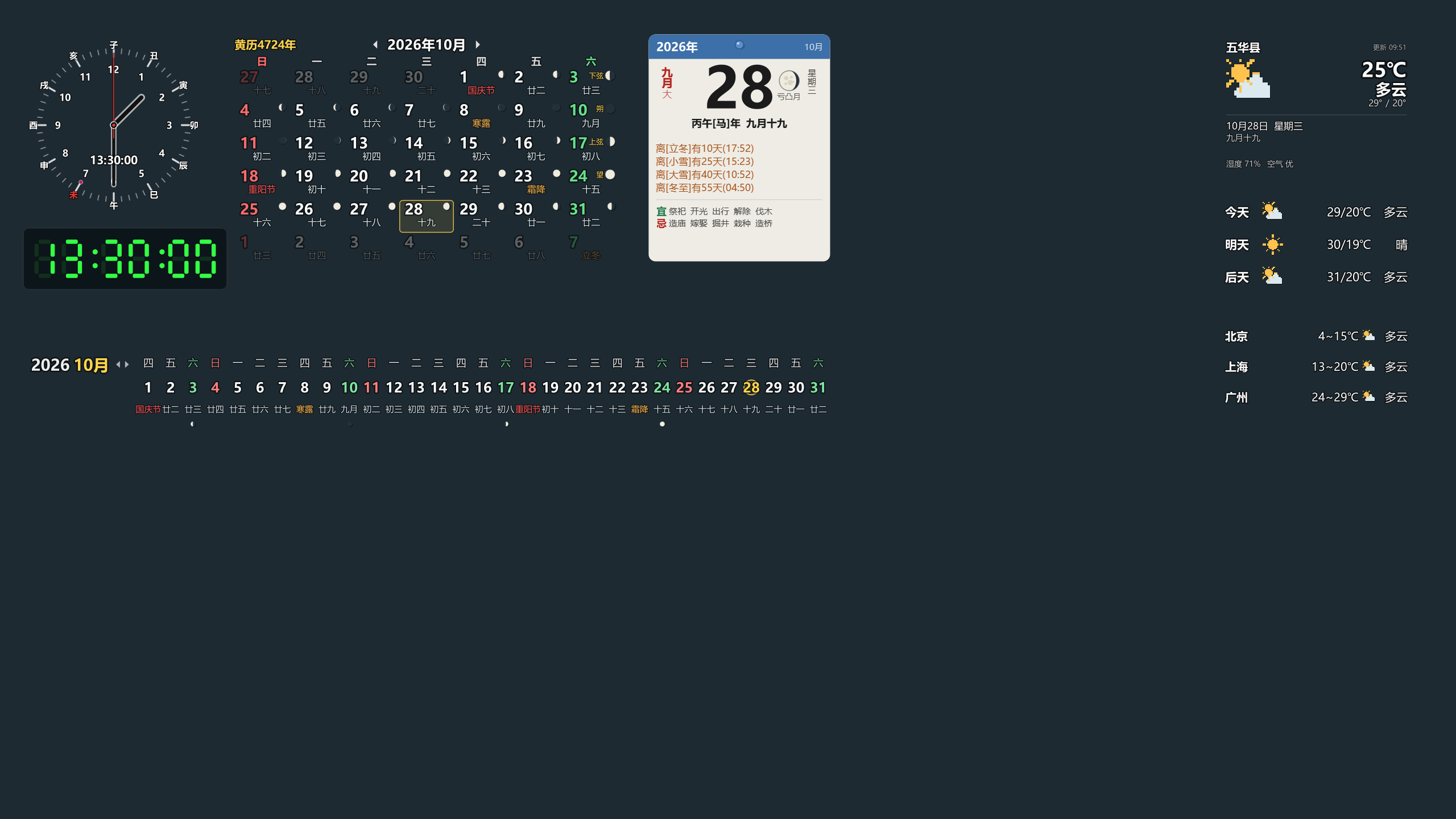
桌面天气日历是一整套摆在桌面上的小面板:天气、时钟、台历、万年历、横幅月历、日出日落、地球公转、世界时间、搜索框、最新消息,一共 12 块,每一块都能单独拖动、缩放、配色、开关内容。
- 界面全部矢量绘制,放大到 3 倍依然清晰;
- 底色默认完全透明,只有字和图标浮在壁纸上;透明时文字自动加一圈对比描边,浅色深色壁纸都看得清;LED 数字钟现在默认也是透明的(以前按"实物材质"留着屏面底色),台历的纸面仍保留底色,需要一样拉到 0;
- 单文件 EXE、免安装,
data\建在 exe 同级目录,整个文件夹拷到别的机器照样能用; - 同一个用户只允许一个实例:再次双击会唤起已有那份的设置窗口,不会多开一套面板;
- 面板默认钉在桌面:在壁纸之上、普通窗口之下,打开浏览器压不住它,按「显示桌面」也还在。

十二块面板
| 面板 | 显示什么 | 双击 |
|---|---|---|
| 旋转时钟 | 12 时辰地支环、当前时辰高亮、更次(如「亥二更」)、红色秒针;表盘可换阿拉伯 / 罗马 / 刻度点,也能套原软件自带的 9 张钟面皮肤 | 打开时钟设置 |
| LED 数字钟 | 矢量七段数码管,或原软件 图形\LED 的 28 款 PNG 数字样式(书写 / 火纹 / 点阵 / 空心黑边 / 电子表 / 雪糕 / 黑客帝国…) | 完整菜单 |
| 桌面天气 | 图标居左,城市 / 温度 / 天气 / 高低温靠右,日期、农历、湿度空气在下方;每个元素可单独拖动摆放、滚轮调字号,排版模式里每行虚线框默认贴合文字宽度 | 立即刷新 |
| 近日天气 | 今天 / 明天 / 后天,可切成六天;行高按字体与图标量,窗口高度跟着行数走(以前把窗口高度平摊给几行,窗口一高行与行就空开一大片) | 3 天与 6 天互换 |
| 关注天气 | 最多 8 个城市,勾选显示,逐个城市配色;行高同近日天气,文字列按最宽的一条量 | 刷新 |
| 台历 | 照设计图分两块:上面是纸(默认 09 号纸样,蓝色色带 + 一枚图钉,「2026年」黑字写在色带里让开图钉),竖排「九月大 / 星期六」夹着大号公历日,纸下沿贴「离[立冬]有8天(17:52)」与「丙午[马] 九月廿二」;下面另贴一张半透明蓝玻璃卡,最近 4 条倒计时写在上面(节气橙、生日绿、节日红,各一行) | 打开日历窗口 |
| 万年历 | 黄历纪年、月历网格、四类节日各可单关、月相当日期数字的背景(0%-1000% 可调)、标记圈的圈大小 40%-300% 与线粗可调、生日 / 备忘的名字直接替换农历那一行 | 双击哪天就看哪天 |
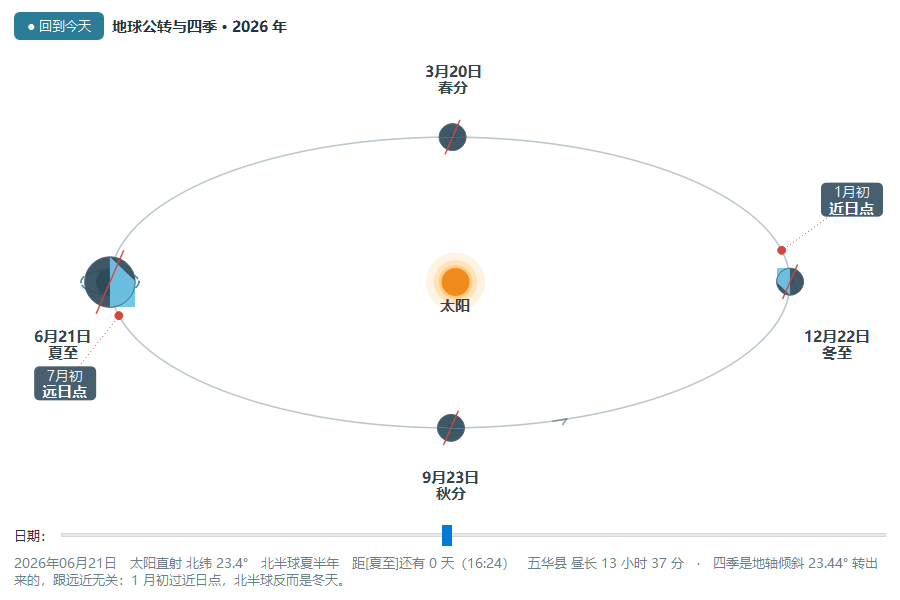
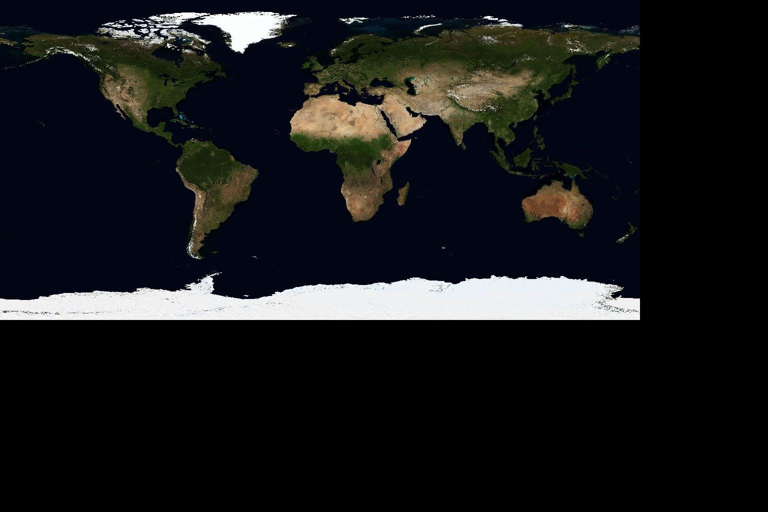
| 日出日落 | 按天气城市经纬度算当地日出日落,三种看法可切:地球仿真(俯视地球、太阳钉在正上方、城市绕进暗面就天黑,晨昏线是晨昏圈的真实投影)、日行轨迹(照教科书「北纬40°二分二至」那幅画,地平椭圆 + 三条轨迹与正午高度 + 一根带真实影长的竿子)、天空视图(方位角摊开 + 高度角竖排,夜里也按真实方位在地平线下标出太阳);极昼极夜直接写出来 | 打开「地球公转与四季」窗口 |
| 公转轨道 | 把「地球公转与四季」做成桌面上的一块透明面板:太阳在椭圆焦点上,春分 / 夏至 / 秋分 / 冬至四颗地球按真实日心黄经摆,地轴四处方向一致、倾 23.44°,近日点(1 月初)与远日点(7 月初)各一枚小牌;顶行日期星期,底行直射点 / 季节 / 下一节气 / 昼长;五处可配色、字号 60%-200%,标签自动找空地、摆不下宁可不写 | 打开带全年滑条的窗口 |
| 横幅月历 | 顶上「2026 10」加翻月箭头,下面 31 天从左铺到右,每天三行,周六绿周日红、节日红节气橙月名淡紫,今日绿笔圈 | 双击哪天就看哪天 |
| 世界时间 | 40 座城市里选最多 8 个,昼夜图标跟当地时间走,跨天标「明天 / 昨天」 | 无 |
| 全能搜索框 | 真输入框(可打中文),下面一排引擎标签点着切,回车开浏览器 | 聚焦输入框 |
| 最新消息 | 自己填起止文字抓取网页列表,没点过的红、双击过的橙、其余普通色,可加多个类型 | 用浏览器打开该条 |

检查更新是真去问服务器的
托盘「帮助 → 检查更新…」、「关于」框里的按钮、软件设置里新增的「检查更新」一组,三个入口都走同一个 UpdateJob 后台线程,界面一秒都不卡。地址默认 http://www.vlss.com/Update.asp?ID=Wallpapers,服务器返回四行 latest= / date= / url= / notes=(说明尾巴上挂的 32 位 MD5 会单独摘出来显示)。版本按点分数字比,0.0.10 算比 0.0.9 新。三条硬规矩:取不到、返回 HTML(比如 404 页)、没有 latest 行,一律当错误报,绝不回一句「已是最新版」;自动检查(开关 + 间隔小时数,开机 14 秒后先查一次)只在真有新版本时弹一句托盘提示,同一个版本号只提一次;地址可以在设置里改成别的源,不用重新打包。
日历与农历
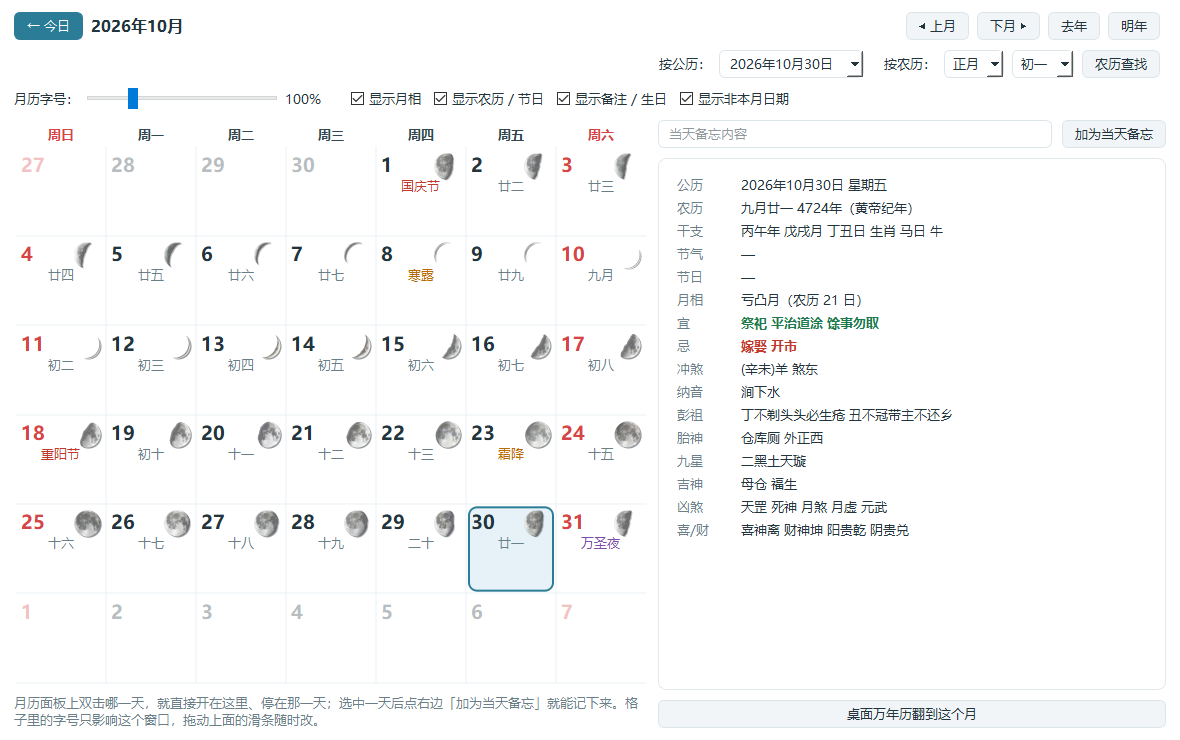
双击台历 / 万年历 / 横幅上的任意一天(或托盘菜单「万年历查询」)打开日历窗口:左边自绘月历,每天右上角一枚当天月相,今天红框、选中蓝框,格子下面排当天的备忘与生日名字;右边是那一天的完整黄历——公历、农历(含黄帝纪年)、干支年月日与生肖、节气、节日、月相、宜、忌、冲煞、纳音、彭祖、胎神、九星、吉神、凶煞、喜神财神方位。顶部除了上月下月去年明年,还能按农历月反查公历日(农历八月十五 → 2026-09-25)。
农历、节气、宜忌、月大月小由 lunar_python 推算,节气取精确时刻;月相按农历日与朔望月长度解析计算。
天气怎么来
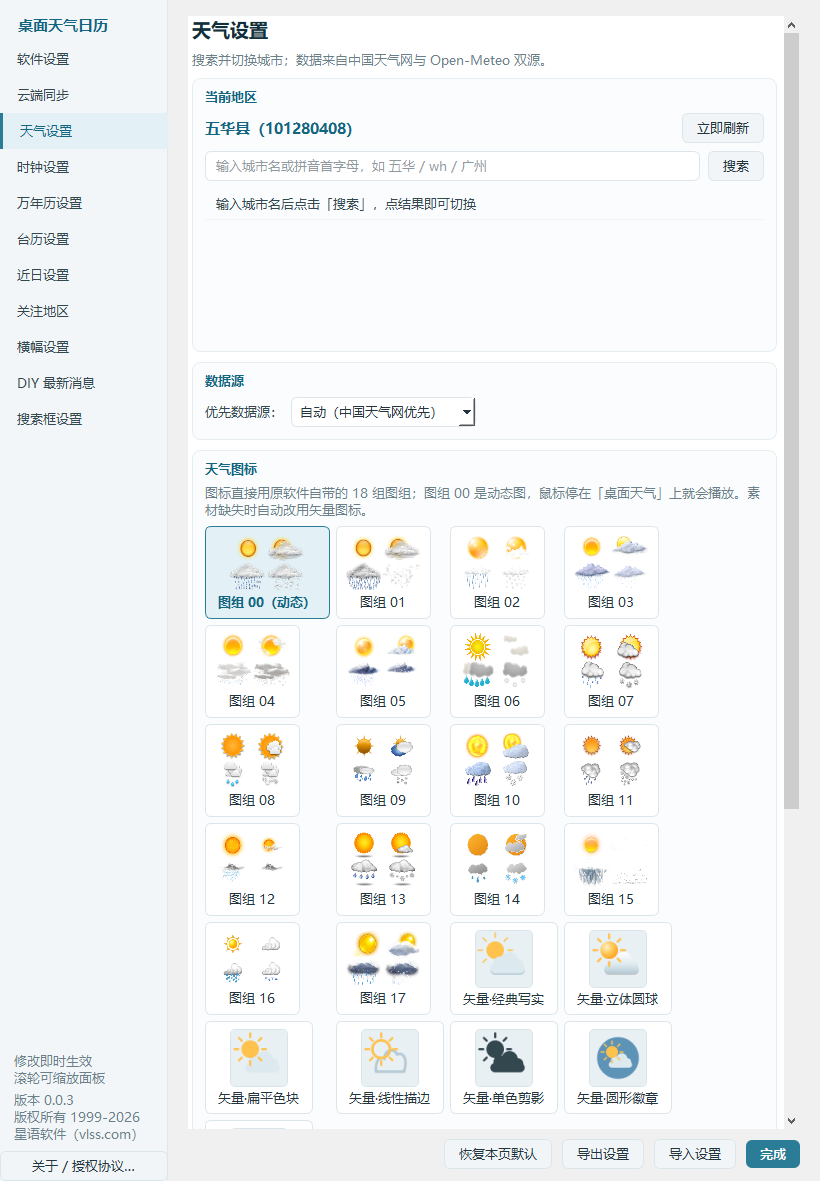
优先走中国天气网,失败自动回退 Open-Meteo;城市搜索支持拼音首字母,结果缓存到 data\weather_cache.json,断网时显示缓存并标注「离线」。天气图标直接选用原软件的 18 组自带图组,另有 7 种矢量图标兜底。面板底色与桌面墙纸都能随天气类别自动更换(晴 / 多云阴 / 雨 / 雪 / 雷阵雨 / 雾霾 / 风沙 / 夜间晴,各绑一张图)。
摆放与手感
左键拖动、松手自动吸附屏幕边缘与其它面板的边与中线;多显示器按所有屏幕的并集算边界,可以直接拖到副屏,不会被主屏右边缘挡住,右键菜单里还有「移到本屏最右边 / 移到右边那块屏」。滚轮整体缩放 0-3 倍(0% 就是收起成一个点,再从设置里拉回来)。首次启动按一张参考桌面截图排布,日出日落、公转轨道等六块默认收起,第一次打开只出现 7 块;换分辨率不丢面板,原来贴着哪条边换完还贴着那条边。
1. 解压到任意目录双击 Wallpapers.exe,不需要安装,也不用装 Python;
2. 首次启动会自动联网取一次天气并生成 data\config.json;
3. 想挪位置就左键按住拖动,靠近边缘自动吸附;想大想小直接滚轮;
4. 想改内容点右键,菜单第一项就是这块面板的设置页;
5. 想让面板贴在桌面上不被窗口压住:右键 → 窗体控制 → 钉在桌面(默认已开);
6. 开机自启在「软件设置」勾选;配置能用「导出 / 导入配置」整套搬走。
天气与最新消息需要联网,数据来自第三方公开接口,极端情况下会限流;断网时读缓存并标「离线」。
语音报时调用 Windows 自带 SAPI,系统里没有中文语音包时会退回提示音。
钉在桌面、开机自启只在 Windows 生效;面板是无边框工具窗口,不占任务栏按钮。
本软件会写注册表 HKCU\...\Run(开机自启)并调用原生窗口接口,部分杀软会误报,请先把软件目录加入信任区再运行。
版权所有 (C) 1999-2026 vlss(星语),作者网站 www.vlss.com,邮箱 admin@vlss.com,技术 QQ 6460546 / 8802975。农历 / 节气 / 宜忌来自 lunar_python(MIT),完整第三方清单与最终用户授权许可协议在关于框内可查看。
What it is
Wallpapers is a set of small panels that live on your desktop: weather, clocks, a paper calendar, an almanac grid, a banner month strip, sunrise/sunset, Earth orbits, world time, a search box and a news ticker - twelve of them, each independently draggable, scalable and colour-configurable.
- Everything is drawn as vectors, so nothing blurs - a panel stays crisp at 3x.
- Backgrounds are fully transparent by default: only text and icons float on the wallpaper, with automatic outlines so they read on light and dark backgrounds. The LED clock is now transparent by default too (it used to keep a screen tint); the calendar page still keeps its paper colour, which you can also drop to zero.
- A single portable EXE - no installer, no Python.
data\is created next to the EXE, so the folder can be carried to another machine and keep working. - One instance per user: double-clicking again raises the existing settings window instead of stacking a second set of panels.
- Panels are pinned to the desktop by default: above the wallpaper, below ordinary windows.
The twelve panels
| Panel | What it shows | Double-click |
|---|---|---|
| Rotating clock | Earthly-Branch hour ring, current hour highlighted, watch-period text, red second hand; Arabic / Roman / tick dials plus the 9 original clock skins | Clock settings |
| LED clock | Vector seven-segment, or one of 28 PNG digit styles from the original set | Full menu |
| Desktop weather | Icon left; city / temperature / condition / hi-lo right; date, lunar day, humidity below. Every element can be moved and sized separately; in layout mode each dashed row hugs its own text width | Refresh now |
| Forecast | Three days, switchable to six; row height is measured from font and icon, window height follows the row count | Toggle 3 / 6 days |
| Watched cities | Up to 8 cities, ticked on, coloured per city; text column measured from the widest entry | Refresh |
| Calendar page | Two blocks as designed: the paper on top (default skin 09: blue band with a drawing pin, "2026" in black inside the band), vertical lunar month and weekday flanking the large solar day, and at the paper's lower edge "8 days to Lidong (17:52)" plus the stem-branch line; below it a translucent blue glass card holding the four nearest countdowns (solar term orange, birthday green, festival red) | Open the calendar window |
| Almanac grid | Traditional year, month grid, four festival groups each switchable, moon phase behind the day number at 0%-1000%, marker circle size 40%-300% and stroke width adjustable, birthday / memo names replace the lunar line | Double-click any day |
| Sunrise / sunset | Computed for the weather city's coordinates, three switchable views: Earth simulation (top-down globe, sun fixed above, the city dot rotating into darkness, the terminator being the true projection of the terminator circle), solar-path diagram (the textbook "40°N at equinoxes and solstices" plate with three tracks, noon altitudes and a gnomon with real shadow length), and sky view (azimuth unrolled, altitude vertical; at night the sun is still plotted below the horizon). Polar day and night are written out plainly | Open the orbit window |
| Earth orbit | The same "Earth orbits and seasons" picture as a transparent desktop panel: sun at the ellipse focus, four Earths at true heliocentric longitudes for the equinoxes and solstices, axes parallel and tilted 23.44°, perihelion (early January) and aphelion (early July) each marked; top line date and weekday, bottom line subsolar latitude / season / next term / day length; five colour slots, font 60%-200%, labels find free space rather than overlap | Open the window with the year slider |
| Banner month | One line with "2026 10" plus arrows, all 31 days across the full width, three lines per day, today circled in green | Double-click any day |
| World time | Up to 8 of 40 cities, day/night icon follows local time | - |
| Search box | A real input field (Chinese supported), a row of engine tabs, Enter opens the browser | Focus the field |
| News ticker | Grab any web list by marking start / end text; unread red, opened orange, everything else normal | Open in browser |
The update check really asks the server
Tray "Help -> Check for updates", the button in the About dialog and the new group on the software settings page all use the same UpdateJob background thread, so the UI never stalls. The default address is http://www.vlss.com/Update.asp?ID=Wallpapers, answered with four lines - latest=, date=, url=, notes= (a 32-hex MD5 at the end of the notes is pulled out into its own field). Versions compare as dot-separated numbers, so 0.0.10 is newer than 0.0.9. Three rules: a failure, an HTML page (e.g. a 404) or a missing latest line is always reported as an error and never dressed up as "already up to date"; the automatic check (switch plus interval, first run 14 seconds after start) only says anything when there really is a new version, and mentions the same version number once; the address is editable in settings, so pointing at another server needs no rebuild.
Calendar and the lunar year
Double-click any day on the calendar page, almanac grid or banner to open the calendar window: a self-drawn month grid with that day's moon phase on the left, and the full almanac for the day on the right - solar and lunar date (including the Yellow Emperor year), stem-branch and zodiac, solar term, festivals, moon phase, auspicious and inauspicious activities, clash, nayin, Peng Zu's taboos, fetal spirit, nine stars, lucky and unlucky deities and the joy / wealth directions. Besides month and year paging you can look up a solar date from a lunar one (lunar 8/15 -> 2026-09-25).
Weather sources
China Weather first, automatic fallback to Open-Meteo; city search accepts pinyin initials; results are cached in data\weather_cache.json and offline the cache is shown, marked "offline". Icons use the original software's 18 image groups with 7 vector styles as fallback. Panel tint and desktop wallpaper can both follow the weather category.
Placement and feel
Drag with the left button; release near a screen or panel edge and it snaps. Multi-monitor boundaries are the union of all screens, so a panel can be dragged onto the second display without being stopped by the primary edge, and the right-click menu offers "move to the far right of this screen / of the screen on the right". The wheel scales 0-3x (0% collapses the panel to a dot). First launch follows a reference desktop shot, with six panels hidden by default so you see seven. Resolution changes never lose panels, and a panel that hugged an edge still hugs that edge.
1. Unpack anywhere and double-click Wallpapers.exe - nothing is installed;
2. The first start fetches weather once and writes data\config.json;
3. Drag to move, scroll to resize;
4. Right-click for content and colours - the first item opens that panel's own page;
5. Keep a panel on the desktop: window control -> pin to desktop (on by default);
6. Enable autostart on the software page, and move everything to another machine with export / import configuration.
Weather and news require network access from third-party public endpoints that can rate-limit; offline the cache is shown and labelled.
Speech chimes use the built-in SAPI; without a Chinese voice pack the software falls back to a beep.
Pinning and autostart are Windows-only; panels are frameless tool windows with no taskbar button.
The program writes HKCU\...\Run and calls native window APIs, which some antivirus products flag. Add the folder to your allowlist before the first run.
Copyright (C) 1999-2026 vlss (Xingyu). Author site www.vlss.com, email admin@vlss.com, QQ 6460546 / 8802975. Lunar data from lunar_python (MIT); the full third-party list and the end-user licence are in the About dialog.